A year ago, my workspace was a mess. I was working from a small corner of my dining table with a laptop, a tangle of charging cables, a half-empty coffee mug from that morning, stacks of paper I was not looking at, and a chair that made my back hurt after forty-five minutes. I thought my workspace did not matter as long as I had a computer and Wi-Fi. I was wrong. The physical space where you work has a profound impact on your focus, energy, and output. When I finally invested time and thought into creating a proper workspace, my productivity and my physical health both improved dramatically. Here is exactly what I did and what I learned along the way.
The Desk That Started It All
The first thing I changed was the desk itself. Working from the dining table meant that my workspace had no boundaries. Work and home life were literally on the same surface. There was no psychological separation between "I am working" and "I am relaxing." I needed a dedicated surface that was only for work.
I purchased a simple standing desk with a crank handle that lets me adjust the height. I did not need anything electric or fancy. The key feature was that it allowed me to alternate between sitting and standing throughout the day. Standing for thirty minutes, sitting for an hour, standing for twenty minutes. This rotation eliminated the back pain I was getting from sitting for eight hours straight and kept my energy more consistent throughout the day.
You do not need to buy a standing desk to create a productive workspace. Any clean, dedicated surface works. The important thing is that it has a defined purpose. If you are working from a kitchen table, consider getting a simple folding desk that you can set up and put away. The physical act of setting up your workspace signals to your brain that it is time to focus. Taking it down signals that work is done. That boundary matters more than most people realize.
Clearing the Clutter
Once I had a dedicated desk, I faced the next challenge. Clutter. My old workspace had accumulated everything I was not currently using but might need someday. Papers, old notebooks, random gadgets, tangled cables, sticky notes with outdated reminders. The visual noise was overwhelming and my focus suffered for it.
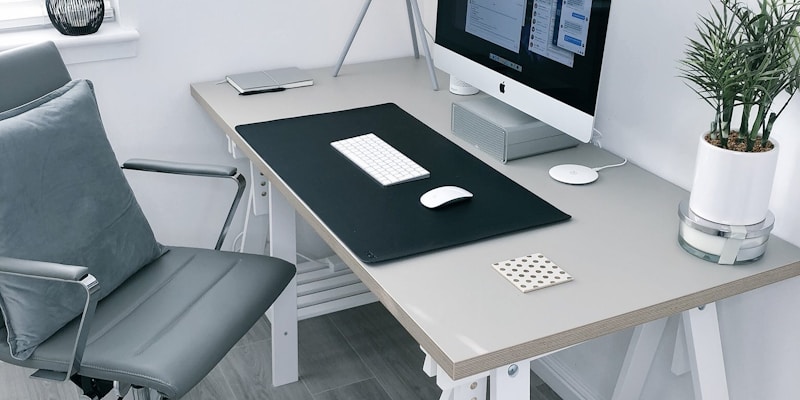
I spent one Saturday afternoon clearing everything off my desk and going through each item. The rule was simple. If I had not used it in the past month, it did not stay on the desk. Papers went into a filing cabinet or the recycling bin. Old cables went into a box in the closet. Random objects went into drawers. What remained was just my computer, a monitor, a keyboard, a mouse, a desk lamp, a small plant, a notebook, and two pens.
The difference was immediate and startling. My desk felt calm. When I sat down to work, there were no visual distractions pulling my attention in different directions. I could focus entirely on the screen in front of me. Research from the Princeton Neuroscience Institute confirms this. Visual clutter competes for your attention and reduces your ability to focus. A clean desk is not about aesthetics. It is about performance.
Now I follow a simple rule. At the end of every workday, I spend two minutes clearing my desk. Papers get filed, cups get washed, everything returns to its default position. The next morning, I sit down to a clean, ready workspace. This nightly reset is as important as the desk itself.
Lighting Made a Bigger Difference Than I Expected
I never thought much about lighting until I started getting headaches in the afternoons. I was working under a single overhead fluorescent light that was too dim in the morning and too harsh in the afternoon. The inconsistency was causing eye strain and contributing to my fatigue.
I made two changes. First, I positioned my desk near the window to get natural daylight during the morning and early afternoon. Natural light is the best light for human beings. It improves mood, energy, and focus in ways that artificial light simply cannot match. If your desk is not near a window, consider rearranging your room to put it near one.
Second, I added a dedicated desk lamp for times when natural light is not available or insufficient. I chose a lamp with adjustable brightness and color temperature. Warm light in the evening for a calmer feel, bright white light during the day for alertness. The lamp goes on the side opposite my dominant hand to avoid shadows on my workspace. This small investment of about thirty dollars eliminated my afternoon headaches and made long work sessions much more comfortable.
I also turned off the overhead fluorescent light entirely. Working with just the desk lamp and natural light creates a more focused pool of light on my work surface while the rest of the room is softer. It is a subtle change but it creates a cocoon effect that helps me concentrate.
Ergonomics Are Not Optional
For the first six months of my serious work-from-home period, I used a dining chair with no lumbar support. By mid-afternoon every day, my lower back was aching, my neck was stiff, and my shoulders were up around my ears. I attributed it to stress. It was actually the chair.
I bought an ergonomic office chair with adjustable height, lumbar support, and armrests. The difference was night and day. Within a week, my afternoon back pain was gone. Within a month, the chronic neck tension I had been dealing with for years had significantly improved. The chair was the single most expensive item in my workspace and the single most impactful purchase I made.
If you cannot afford an ergonomic chair right now, there are smaller adjustments that help. Put a rolled-up towel behind your lower back for lumbar support. Stack a couple of books under your monitor to raise it to eye level so you are not looking down and straining your neck. Use a separate keyboard and mouse so your arms can rest at a natural angle instead of reaching up to a laptop screen. These adjustments cost almost nothing and make a real difference in comfort and endurance.
The key ergonomic principle is that your body should be in a neutral, relaxed position. Feet flat on the floor. Knees at roughly ninety degrees. elbows at roughly ninety degrees. Screen at eye level. Shoulders relaxed. If any part of your body is straining, reaching, or hunching, adjust until it is comfortable. Your body is the tool you use to do everything else. Take care of it.
Minimizing Digital Distractions
A productive workspace is not just about the physical environment. Your digital environment matters just as much. I organized my computer the same way I organized my desk. Clean desktop, minimal open tabs, focused applications.
I removed every icon from my computer desktop. Clean wallpaper, nothing else. I organized my bookmarks into a simple bar with only the five sites I use daily. I installed a browser extension that blocks social media sites during work hours. My notifications are turned off for everything except direct messages from a few key contacts. I set my computer to do not disturb mode during my focus hours.
One of the most effective digital changes was creating user profiles on my computer. One profile is for work. It has my work email, work bookmarks, work applications, and nothing else. The other profile is for personal use. When I log into the work profile, the clean, focused environment tells my brain it is time for deep work. When I log into the personal profile, I can relax without the mental pull of work tasks. This separation mirrors the physical boundary of having a dedicated desk.
For more on managing distractions and maintaining focus throughout the day, I wrote extensively about this in Simple Tips to Stay Focused All Day. The workspace setup and the focus habits work together to create an environment where deep work becomes almost automatic.
Plants and Personal Touches
This might sound purely aesthetic, but adding a small plant to my workspace improved how I feel about being there. I am not a plant person and I chose a low-maintenance pothos that thrives on neglect. But having something green and alive on my desk makes the space feel less sterile and more human. Research from the University of Exeter found that offices with plants saw a fifteen percent increase in productivity. The effect is real.
I also added a small photo of my family. Not for productivity reasons, but as a reminder of why I am working. When I feel stuck or frustrated, glancing at that photo reconnects me with my motivation. These personal touches turn a generic workspace into my workspace. That sense of ownership and belonging in your space makes you want to be there, which makes focus easier.
Keep personal touches minimal though. One or two items. The goal is a space that feels welcoming but not cluttered. Every item on your desk should either serve a functional purpose or bring you genuine joy. If it does neither, it should not be there.
The Tools That Help
Over time, I have accumulated a few tools that genuinely improve my workspace experience. A good pair of noise-canceling headphones for deep work sessions. A monitor stand that raises my screen to the correct eye level. A wireless keyboard and mouse that give me freedom to position my hands comfortably. A small whiteboard on the wall next to my desk for quick notes and weekly priorities.
I also invested in a good water bottle that sits on my desk. Staying hydrated throughout the day improves focus and reduces headaches. Having it within arm's reach means I actually drink enough water instead of forgetting because it is in another room. This connects to the morning hydration habit I mentioned in my post about morning routines. Hydration is an all-day commitment.
What I deliberately avoided was over-investing in fancy gadgets and productivity tools. It is tempting to believe that the right app or the perfect planner or the most expensive desk accessory will solve your productivity problems. It will not. The fundamental elements of a productive workspace are simple. A clean surface, good lighting, comfortable seating, minimal distractions, and a clear purpose. Everything else is optional.
The Weekly Workspace Maintenance
Every Friday afternoon, I spend fifteen minutes on a deeper workspace maintenance. I wipe down the desk and monitor. I organize any papers that accumulated during the week. I check cables and make sure nothing is tangling or breaking. I water my plant. I update my whiteboard with next week's priorities. I restock supplies like sticky notes and pens.
This weekly maintenance prevents the slow creep of clutter and disorganization that happens even with good daily habits. Without it, the desk gradually accumulates things. A receipt here. A notebook there. A few more cables. Before you know it, you are back to working in chaos. The fifteen-minute weekly reset keeps everything at a consistently high standard.
I do this maintenance as the last thing before my weekend begins. It is a natural transition point from work mode to rest mode. It also means that when I sit down on Monday morning, everything is fresh, clean, and ready. The feeling of starting a week in a well-organized workspace is underrated. It sets a positive tone for the entire week.
My Workspace Before and After
To give you a concrete picture of the transformation. Before: dining table corner, tangled cables, overflowing papers, laptop only, overhead fluorescent light, uncomfortable chair, phone always within reach, no personal touches. I dreaded sitting down to work. My back hurt by lunch. I was constantly distracted.
After: dedicated standing desk, clean surface with only essential tools, adjustable desk lamp with natural light from a window, ergonomic chair with lumbar support, noise-canceling headphones for deep work, small plant and family photo, phone charging in another room. I look forward to sitting down to work. I can go for hours without physical discomfort. My focus is dramatically better.
The total investment was not extravagant. The chair was the most expensive piece. The desk, lamp, monitor stand, and other items were all mid-range. The biggest investment was time. One Saturday for the initial setup and fifteen minutes per week for maintenance. That is all it takes to transform your workspace from a source of stress into a tool for productivity.
"Your workspace is not just where you work. It is a reflection of how seriously you take your work and how much you respect your own focus and comfort. Design it accordingly."
Start Where You Are
You do not need to overhaul your entire workspace overnight. Start with the simplest, highest-impact change. For most people, that is clearing the clutter. Spend ten minutes right now removing everything from your desk that does not need to be there. Just that single change will make a noticeable difference in how you feel when you sit down to work.
Then tackle lighting. Then seating. Then digital distractions. Build your ideal workspace gradually, the same way you would build any other good habit. The workspace you create today will pay dividends in focus, comfort, and output for years to come. And once your space is optimized, pair it with strong daily habits like the ones in 10 Morning Habits That Changed My Life, the weekly planning system for organizing your priorities, and the evening routine that ensures you are rested and ready to make the most of your workspace the next day.
Your environment shapes your behavior. Make it shape your behavior in the direction you want to go.